How PAYS POS Reduces Menu Complexity in High-Volume Quick-Service Restaurants
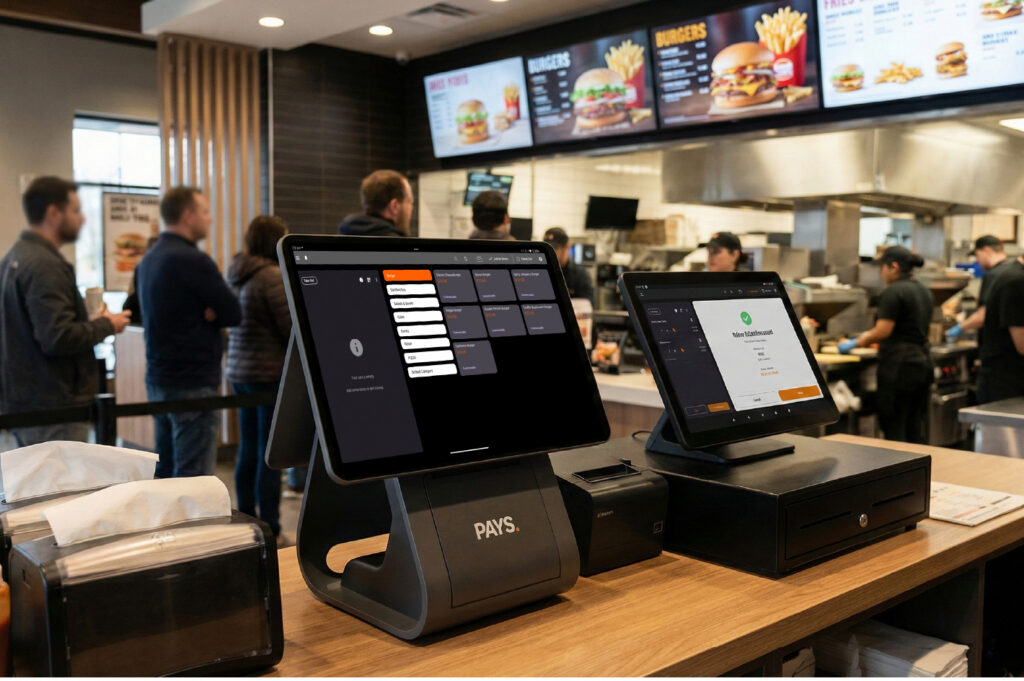
Is your menu complexity costing you up to 10-15% of your peak-hour efficiency?
Speed is crucial in a busy quick-service restaurant. Each extra modifier, combo, or special offer adds stress for your staff and slows service. What seems like a way to boost sales can quickly lead to chaos during busy times.
If you’re managing dozens or even hundreds of SKUs across multiple locations, you already know how complicated it becomes to keep pricing consistent, update menus in real time, and train new employees quickly. One outdated item or incorrect modifier can create a chain reaction of order errors, kitchen delays, and frustrated customers.
Longer lines mean fewer chances to make sales. The truth is, menu complexity isn’t just a design problem; it’s a system problem. Without the right POS infrastructure, your restaurant absorbs hidden costs in wasted inventory, slower turnaround times, and inconsistent customer experiences.
That’s where a smarter approach becomes critical. With PAYS POS, you don’t just digitize your menu; you simplify it strategically so your operations stay fast, accurate, and scalable, even during peak hours.
Why Menu Complexity Hurts High-Volume QSR Operations
Expanding your menu can feel like growth. More options seem like more sales opportunities, but each new item or modifier actually adds more work for your team.
In a busy QSR, even a few extra seconds per order can cause bottlenecks. If staff have to search cluttered screens or adjust modifiers by hand, service slows. These small delays add up to longer lines, stressed staff, and lost sales.
You also face higher training costs. The more complex your menu structure, the longer it takes for new employees to become efficient. Instead of focusing on customer experience, your team spends valuable time memorizing item hierarchies, pricing tiers, and customization rules.
Menu complexity also increases the risk of:
- Incorrect pricing or discount application
- Order entry mistakes
- Kitchen miscommunication
- Inventory mismatches
- Inconsistent experiences across locations
If you run several locations, the problem grows. Manually updating menus across branches leads to inconsistencies and confusion.
The result is slower service, more mistakes, and lower profits, all because a menu that seems simple is actually hard to manage.
Simplifying your menu doesn’t mean offering fewer choices. It means organizing them smartly so your system helps, not hinders, your team.
The Hidden Cost of Complicated Digital and In-Store Menus
A hard-to-navigate menu affects more than just speed. The real cost of complexity often appears in shrinking profit margins before you even notice.
Each wrong modifier or missed customization leads to waste. A wrong order means remaking food, throwing out ingredients, and losing valuable kitchen time during busy hours. Even a few mistakes can cost thousands in lost revenue each year.
Additionally, complicated menus can overwhelm customers, especially at self-order kiosks. If your guests can’t find what they want or feel rushed, they may leave or pick cheaper items, which lowers your average ticket size.
On the operational side, complex menus can cause:
- Inventory discrepancies due to misranged items
- Delays in the kitchen display system (KDS) communication
- Promotional items are not syncing properly across locations.
- Pricing inconsistencies during limited-time offers
- Reduced throughput during peak periods
If your digital menu and in-store POS aren’t in sync, your restaurant pays the price. During busy times, that inefficiency gets expensive.
The more complex your menu, the harder it is to keep things fast, accurate, and consistent. That’s why it’s just as important to simplify your backend as it is to improve what customers see.
Also Read: How the Menu Engineering Matrix Can Transform Your Restaurant Profits
How PAYS POS Simplifies Menu Management
Complex menus don’t have to mean complex operations. With PAYS POS, you get centralized control that turns menu chaos into organized efficiency.
You don’t have to update items at each terminal or location. With one dashboard, you can adjust pricing, launch offers, or remove out-of-stock items, and changes show up everywhere right away.
Here’s how PAYS POS helps you simplify:
- Centralized Menu Control: Update items, modifiers, combos, and pricing across multiple locations in real time.
- Smart Category Structuring: Organize items logically to reduce screen clutter and improve order flow.
- Optimized Modifier Management: Group and streamline add-ons to reduce unnecessary clicks.
- Combo Auto-Bundling: Pre-define meal combinations to speed up order entry.
- Real-Time Availability Sync: Automatically hide out-of-stock items to prevent order errors.
- Data-Driven Menu Insights: Identify best-sellers and low-performing items to eliminate underperforming SKUs.
Rather than giving your staff a complicated menu, you provide a simple, easy-to-use interface that helps them make decisions faster and serve customers more quickly.
A smarter menu structure helps your team work faster. In a busy quick-service restaurant, speed is your edge over the competition.
Faster Order Processing with Smart Menu Design
When your restaurant is busy, every second matters. If your POS takes too many taps or adjustments, service slows, and customers get frustrated.
PAYS POS is designed for speed, not just organization. The interface makes things easier at the counter, drive-thru, and self-order kiosk.
Here’s how it helps you process orders faster:
- Intuitive Visual Layouts: Clearly structured categories make items easy to locate instantly.
- Quick Search Functionality: Staff can find items in seconds without navigating multiple screens.
- Favorites & Best-Seller Highlighting: Frequently ordered items appear prominently, reducing clicks.
- Pre-Configured Modifiers: Smart defaults minimize manual selections.
- Self-Order Kiosk Sync: Customers experience the same streamlined menu structure, reducing confusion and hesitation.
The result is shorter lines, quicker transactions, and more orders during busy hours.
When your system eliminates unnecessary steps, your team can focus on serving customers rather than navigating complicated screens. In a busy QSR, this clarity drives more revenue per hour.
Better Kitchen Coordination and Real-Time Inventory Control
If your front-of-house and kitchen systems aren’t in sync, menu complexity can cause chaos. Miscommunication leads to delays, waste, and frustration for both staff and customers.
With PAYS POS, your menu connects directly to your kitchen and inventory systems in real time, not just the billing screen.
Here’s how you gain operational clarity:
- Seamless Kitchen Display System (KDS) Integration: Orders flow directly to the kitchen with clear modifiers and instructions, reducing confusion.
- Automatic Out-of-Stock Sync: When an item runs out, it’s instantly hidden from POS and kiosks to prevent wrong orders.
- Real-Time Inventory Tracking: Every item sold automatically adjusts stock levels, keeping counts accurate.
- Recipe-Level Mapping: Menu items are tied to ingredients, helping you monitor usage and reduce waste.
- Reduced Remakes & Food Waste: Accurate order transmission means fewer mistakes and lower costs.
Your entire operation uses a single reliable system, rather than relying on manual updates or word of mouth.
In a busy QSR, keeping your menu, kitchen, and inventory in sync is what keeps service running smoothly, even during rush hours.
Real Impact for Multi-Location Quick-Service Brands
If you run more than one location, menu complexity does not just multiply, it gets even harder. What seems easy at one site can become confusing and expensive across several branches.
With PAYS POS, you stay in control and keep your flexibility.
Here’s how it supports growing QSR brands:
- Standardized Menus Across Locations: Ensure every branch follows the same structure, pricing logic, and combo rules.
- Centralized Updates: Roll out new items, promotions, or pricing changes across all outlets instantly.
- Location-Specific Customization: Adjust select items based on regional demand without disrupting the core menu structure.
- Simplified Staff Training: A consistent interface across branches reduces onboarding time and learning curves.
- Performance Comparison Insights: Identify which menu items perform best at specific locations and refine accordingly.
As your brand grows, maintaining consistent operations is key. Without centralized control, menu differences can hurt your brand and cause pricing issues. When your POS system keeps your menu streamlined across all branches, you gain something every high-volume QSR needs: scalable simplicity.
Also Read: How PAYS POS Simplifies Loyalty Programs for Multi-Location Franchises
Why High-Volume QSRs Choose PAYS POS
If your restaurant handles hundreds or thousands of orders each day, your POS system should not slow you down. You need a system that is reliable, fast, and built for busy times.
That’s why busy quick-service brands choose PAYS POS, it reduces menu complexity without holding back your growth.
Here’s what makes it the preferred choice:
- Speed-Optimized Interface: Designed to minimize clicks and maximize order throughput.
- Centralized Command Center: Control menus, pricing, and promotions across all locations from one dashboard.
- Peak-Hour Stability: Built to perform consistently during heavy transaction loads.
- Data-Driven Menu Optimization: Identify top-performing items and eliminate underperforming SKUs.
- Seamless Integrations: Works smoothly with kiosks, kitchen displays, and inventory systems.
- Scalable Architecture: Supports expansion without increasing operational complexity.
With a smart POS system, your menu becomes an advantage, not a problem. Your team can serve faster, make fewer mistakes, and maintain consistency across the board.
In busy quick-service restaurants, simplicity does not mean fewer choices, it means managing them in a smarter way.
Also Read: Point of Sale Software That Increases Speed, Accuracy, and Daily Revenue
Conclusion
Menu complexity doesn’t just slow down your screens; it slows your whole operation. In a busy QSR, every extra click or unclear update costs you time, accuracy, and money.
To grow without chaos, you need to simplify your systems. With a smart POS, your staff works faster, your kitchen runs smoother, and your customers wait less.
With PAYS POS, you don’t have to reduce menu variety to gain efficiency. You gain centralized control, real-time updates, smart categorization, and seamless integrations, all designed to keep your QSR running at peak performance, even during the busiest hours.
Growth should increase revenue, not complexity.
If your menu is slowing you down, it is time to switch to a smarter system.
Book a free demo with PAYS POS today to see how you can simplify menu management, cut down on errors, and boost efficiency at every location.
Make your operations simpler. Serve customers faster. Grow your business with confidence.
FAQs
PAYS POS centralizes menu management, allowing you to organize categories, streamline modifiers, auto-bundle combos, and update pricing in real time. This reduces screen clutter, speeds up order entry, and minimizes errors during peak hours.
Yes. PAYS POS enables centralized control, so you can instantly roll out new items, promotions, or pricing changes across all branches. You can also customize specific items by location without disrupting your overall menu structure.
Absolutely. PAYS POS integrates seamlessly with self-order kiosks and kitchen display systems (KDS), ensuring consistent menu structure, accurate modifier communication, and real-time order transmission from the front counter to the kitchen.
By syncing menu availability in real time and clearly mapping modifiers to kitchen instructions, PAYS POS reduces incorrect orders and remakes. Automatic out-of-stock updates also prevent customers from ordering unavailable items.
Yes. PAYS POS is built to scale with your business. It supports high transaction volumes, standardized menus across locations, centralized reporting, and performance insights, making it ideal for expanding quick-service restaurant brands.