Why Manage Multiple Systems When One Online Point of Sale Can Handle Everything?
TL;DR:
- Managing multiple systems slows your business, increases errors, and adds hidden costs.
- A modern online POS replaces billing, inventory, payments, reporting, CRM, and staff management in one platform.
- PAYS POS simplifies everything with one dashboard, 0 per cent processing fees, next-day funding, and multi-location support.
- If you want faster operations and fewer headaches, switching to a single online POS is the smartest upgrade.
What would your day look like if you weren’t switching between five different systems just to run one business? It sounds exaggerated, but it’s real. Studies show teams lose up to 30% of their productivity simply because their tools don’t talk to each other.
So here’s the real question: why manage multiple systems when one online POS can handle everything?
From billing to inventory, payments to reporting, most businesses stitch together separate apps because that’s how they’ve always worked. But as your operations grow, this scattered setup becomes a silent productivity killer, with slower checkouts, delayed decisions, frustrated staff, and rising hidden costs.
This blog breaks down why a unified online POS isn’t just a convenience. It’s the upgrade that can simplify your operations, cut waste, and help you run faster than ever. Let’s get into it.
What is the Real Problem With Managing Multiple Systems
When you rely on separate tools for billing, inventory, payments, and reporting, you’re creating more work than you realize. It feels normal because you’ve been doing it for years, but the cracks show up every single day.
Data Scattered Across Tools
Your data lives everywhere. In the app for billing, another for inventory, and another for payments, everywhere. You’re constantly switching tabs, exporting files, or reconciling numbers that never match. It slows you down and increases the chances of mistakes.
Your Team Wastes Time Jumping Between Apps
Every extra click, login, or workaround your team performs is time taken away from serving customers. When your tools don’t sync, your staff ends up doing double work instead of doing what actually matters.
Higher Error Rates and Zero Real-Time Visibility
Disconnected systems mean delayed updates. You don’t see stock changes instantly, reports take forever, and simple tasks require manual correction. By the time you spot a problem, it’s already affected your day.
You’re Paying More Than You Think
Multiple subscriptions, add-ons, payment gateways, support costs, they add up quietly. You may not notice it month to month, but over a year, you’re spending far more than a unified online POS would cost.
What a Modern Online POS Actually Replaces
When you move to a modern online POS, you eliminate the need for multiple disconnected tools. Instead of juggling different apps that never sync, you control everything from one dashboard. This gives you cleaner data, faster decisions, and a smoother daily workflow.
Billing and Checkout Workflows
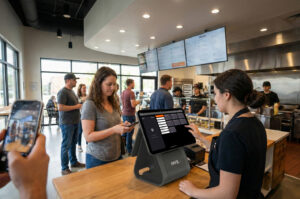
Your online POS becomes the central hub for all transactions. Whether you are processing cash, cards, UPI, or online orders, everything flows through one system. No separate billing software. No manual reconciliation. Every sale is recorded instantly and accurately.
Inventory and Stock Management
Instead of updating stock manually across multiple platforms, your POS updates inventory in real time the moment a sale is made. You always know what is available, what is running low, and what needs ordering. This helps you avoid stockouts, overstocking, and last-minute panic.
Multi-Channel Payments
You no longer need separate tools for card payments, QR codes, or online transactions. One online POS handles it all. This means faster checkout, fewer failed payments, and better visibility into how customers prefer to pay.
Reporting, Analytics, and Daily Summaries
Instead of exporting reports from different systems, your online POS gives you automatic daily summaries, sales breakdowns, product reports, and staff performance insights. You get real-time data that helps you make decisions immediately instead of waiting until the end of the week.
Staff Management and User Permissions
You can add team members, assign roles, set access levels, and monitor performance from a single place. No separate attendance or tracking tools needed. This keeps your operations transparent and reduces internal errors.
Customer CRM and Loyalty Tracking
A good online POS also replaces separate customer management tools. You can track purchase history, store customer profiles, and run loyalty programs without any extra software. This helps you build repeat business with minimal effort.
What to Look for in the Right Online POS
Once you decide to move away from multiple systems, the next step is choosing the right online POS. Not every platform is built the same, and the wrong choice can put you right back into the same chaos you are trying to escape. Here are the key things you should focus on when evaluating any online POS for your business.
Cloud-Based, Fast, and Reliable
Your POS should work smoothly whether you are at the counter, managing operations remotely, or checking reports from another location. A cloud-based system gives you real-time visibility without local server issues or outdated software. You get instant updates, automatic backups, and consistent performance across all devices.
Integrations You Actually Need
Many businesses end up paying for integrations they never use. Focus only on what matters for your operations. This could be payment processing, accounting tools, online ordering platforms, delivery partners, or loyalty apps. A good online POS connects with the tools you rely on and eliminates all the extra steps.
Easy Team Adoption
Your POS should help your team, not confuse them. Look for a clean interface, simple workflows, and a minimal learning curve. If your staff can understand the system within minutes, you save time on training and reduce daily errors. A user-friendly POS keeps your team confident and your operations smooth.
24/7 Support and Quick Issue Resolution
Even the best systems need support. Choose a POS provider that responds quickly, solves issues on the first interaction, and offers round-the-clock assistance. When your business runs long hours, you cannot afford slow replies or ticket delays. Fast support keeps your checkout running without interruptions.
Transparent Pricing Without Add-Ons
Avoid POS systems that look cheap on the surface but get expensive through hidden charges. Transparent pricing means you know exactly what you are paying for. No surprise fees, no forced add-ons, and no extra charges for basic features. The right online POS should help you lower costs, not increase them over time.
Where PAYS POS Makes This Transition Effortless
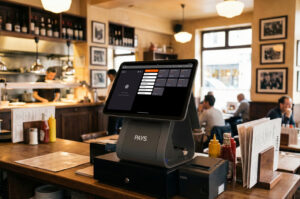
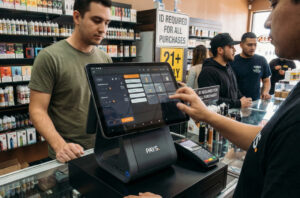
If you are tired of juggling multiple systems, PAYS POS gives you a clean, unified way to run your entire business from one place. You do not need separate software for billing, inventory, payments, reporting, or multi-location control. Everything you need is built into one platform that is fast, simple, and designed for growth.
One Dashboard for Everything
Instead of jumping between five different tools, you manage your entire operation from a single dashboard. Sales, stock, payments, staff activity, and customer insights are always one tap away. This saves you time and gives you full visibility into your business every minute of the day.
Online POS With 0 Percent Processing Fees
Your payment costs drop instantly because PAYS POS does not charge processing fees. You can accept cards, UPI, QR, or online payments without losing margins to transaction charges. It is one of the easiest ways to improve profitability without changing your workflow.
Next-Day Funding to Keep Cash Flow Smooth
You do not have to wait days to receive your money. With next-day payouts, your cash flow stays predictable, and your operations stay stable. This is especially useful during peak seasons, busy weekends, or expansion phases.
Real-Time Inventory, Reporting, and Payments
Every sale updates your inventory, reports, and payment records instantly. You always know what is in stock, what is selling fast, and what is impacting your revenue. Real-time insights help you avoid mistakes, make faster decisions, and respond to trends immediately.
Multi-Location and Multi-Device Support
Whether you run one store or ten, you can manage every location from the same system. Staff access, pricing, menus, stock, and reports can all be controlled centrally. Your team can log in from tablets, phones, or POS terminals with the same smooth experience.
Built for Restaurants, Retail, Cafes, Bars, and Salons
PAYS POS is built to fit different business models without complicated setups. You get industry-specific workflows that are ready to use. This helps you launch faster and operate with fewer errors, no matter what type of business you run.
Conclusion
Running your business on multiple disconnected systems might feel manageable today, but over time, it slows you down, increases errors, and quietly adds to your costs. When every tool operates separately, you spend more time fixing problems than growing your business.
A unified online POS changes that completely. You get one dashboard, one real-time source of truth, and one system that handles your billing, inventory, payments, reporting, and customer data. This gives you cleaner workflows, faster decision-making, and a smoother experience for both your team and your customers.
If you want to simplify your operations and take back control of your day, switching to a modern online POS is the smartest move you can make.
Take the first step toward running your business with less stress and more clarity. Book a PAYS POS demo and see how one system can manage everything for you.
FAQs
It is a cloud-based platform that manages billing, inventory, payments, and reporting from one dashboard.
It combines checkout, stock tracking, payments, CRM, and analytics into a single system.
Yes, you can control all locations, menus, pricing, and staff access from one account.
Modern systems use encrypted, cloud-based security to protect your business information.