Retail Inventory Management Mistakes and How Technology Helps You Avoid Them
Are inventory problems quietly eating into your retail profits without you even noticing?
You might think inventory management is just about knowing what’s on your shelves, but in reality, it impacts everything, such as cash flow, staffing, customer satisfaction and repeat sales. When products are overstocked, your capital gets stuck. When popular items run out, customers walk away disappointed. And when inventory data is inaccurate, every decision you make becomes a guess.
The challenge is that many retailers still rely on manual tracking, disconnected systems, or outdated processes that simply can’t keep up with the modern retail environment. This is where technology changes the game. By using modern, tech-driven inventory tools, you can spot mistakes early, streamline operations, and turn inventory management from a constant headache into a competitive advantage.
Why Inventory Management Is a Critical Retail Challenge
Inventory isn’t just a back-office task it directly affects how smoothly your entire retail operation runs. Every product you order, store, and sell ties up money, space, and time. When inventory isn’t managed properly, even strong sales can fail to translate into healthy profits.
As a retailer, you’re dealing with multiple moving parts at once: changing customer demand, seasonal trends, supplier lead times, and often both online and in-store sales. Without real-time visibility, it becomes difficult to know what’s selling, what’s sitting idle, and what needs to be reordered.
On top of that, manual processes and disconnected systems increase the risk of errors. A small miscalculation can lead to stockouts, overordering, or inaccurate reporting all of which hurt customer experience and decision-making. That’s why inventory management has become one of the biggest operational challenges in modern retail, and why technology plays such an important role in getting it right.
Common Retail Inventory Management Mistakes You Might Be Making
Even if your store is performing well on the surface, inventory missteps can quietly slow your growth. When you’re juggling suppliers, customers, staff, and daily operations, it’s easy for small inventory issues to slip through the cracks. Over time, those small issues turn into costly problems. Here are some of the most common inventory management mistakes you might be dealing with and why they hold you back.
Relying on Manual Tracking or Spreadsheets
If you’re still tracking inventory using spreadsheets or manual counts, you’re putting your operations at risk. Every manual entry increases the chance of human error, whether it’s a missed update, a wrong quantity, or delayed reporting. As your product catalog grows, keeping spreadsheets accurate becomes time-consuming and frustrating.
Without real-time updates, you’re often making decisions based on outdated information. You may think an item is in stock when it’s already sold out, or reorder products you don’t actually need. This lack of accuracy slows down your operations and makes it harder to respond quickly to customer demand.
Overstocking Slow-Moving Products
When you overestimate demand, you end up with shelves full of products that don’t sell. This ties up your working capital money that could have been invested in faster-moving items, marketing, or store improvements. Overstocking also increases storage costs and, in some cases, leads to spoilage or outdated inventory.
You might keep reordering the same products out of habit, without realizing they’re no longer popular. Over time, this creates cluttered shelves, inefficient storage, and unnecessary financial pressure that limits your ability to grow.
Running Out of High-Demand Items
On the other hand, understocking popular products can be just as damaging. When customers walk in looking for items you’ve run out of, you lose immediate sales and possibly future ones too. Repeated stockouts send a message that your store is unreliable, pushing customers toward competitors.
Without accurate forecasting, you’re often reacting too late. By the time you realize an item is selling fast, it’s already gone. This reactive approach makes it difficult to keep up with demand, especially during peak seasons or promotions.
Lack of Inventory Visibility Across Channels
If you sell both in-store and online, disconnected inventory systems can create chaos. When stock levels aren’t synced across channels, you risk overselling products that aren’t actually available. This leads to canceled orders, delays, and frustrated customers.
You may also struggle to understand where your inventory is performing best. Without centralized visibility, it’s hard to balance stock between locations or channels, making your operations less efficient and more stressful than they need to be.
Ignoring Data and Demand Trends
When inventory decisions are based on intuition instead of data, you’re essentially guessing. Sales patterns, seasonal demand, and regional preferences all influence what customers buy but without analytics, these insights go unnoticed.
You might miss opportunities to prepare for seasonal spikes or fail to adjust inventory based on changing customer behavior. Over time, this leads to repeated mistakes, inconsistent stock levels, and lost revenue that could have been avoided with better data-driven planning.
How Modern Point of Sale Systems Help You Avoid These Inventory Mistakes
A modern point of sale system does more than process transactions; it gives you complete control over your inventory in real time. By replacing manual processes with automated, data-driven tools, you can eliminate guesswork and prevent the inventory mistakes that slow your business down.
Real-Time Inventory Tracking Across Every Sale
With a modern POS, your inventory updates automatically every time a sale is made. This means you always know exactly what’s in stock, what’s running low, and what’s selling fast without manual counts or spreadsheet updates.
Instead of relying on outdated data, you make decisions based on live inventory levels. This helps you avoid overselling, understocking, and last-minute surprises that disrupt daily operations.
Smarter Reordering and Low-Stock Alerts
Modern POS systems help you stay ahead of stock shortages by sending alerts when inventory reaches predefined levels. You don’t have to constantly monitor stock or worry about forgetting to reorder essential items.
By automating reordering decisions, you reduce the risk of running out of high-demand products while avoiding unnecessary overstock. This keeps your shelves balanced and your cash flow healthier.
Data-Driven Demand Forecasting
When your POS tracks sales trends over time, it helps you understand what your customers actually want. You can spot patterns related to seasonality, promotions, and buying behavior, allowing you to plan inventory more accurately.
Instead of guessing future demand, you rely on historical data and analytics to stock the right products at the right time reducing waste and missed sales opportunities.
Centralized Inventory Management Across Channels
If you sell in-store, online, or across multiple locations, a modern POS gives you a single, centralized view of your inventory. All channels stay in sync, so customers see accurate stock availability wherever they shop.
This unified approach helps you avoid order cancellations, inventory mismatches, and manual reconciliation. You gain better control while delivering a smoother customer experience.
Better Insights for Smarter Decisions
Modern POS systems provide detailed reports and dashboards that show product performance, turnover rates, and inventory aging. These insights help you identify slow-moving products, optimize pricing, and refine purchasing strategies.
With clearer visibility into your inventory, you make confident, informed decisions that support long-term growth, not reactive fixes.
What to Look for in a Modern POS for Inventory Management
When choosing a point of sale system to help you avoid inventory mistakes, not all solutions are created equal. The right POS will not only track stock levels but also allow you with tools that simplify operations, boost accuracy, and support growth.
Here’s what you should focus on when you are thinking about your options:
Automated Alerts & Reordering
Look for systems that let you set low-stock thresholds and send automatic alerts when you need to reorder. Some systems can even trigger reorder suggestions based on recent demand, saving you time and preventing unnecessary manual checks.
Advanced Reporting & Analytics
Strong reporting features help you understand sales velocity, best- and worst-selling products, turnover rates, and seasonal demand. These insights allow you to make smarter purchasing decisions and avoid costly inventory mistakes.
Multi-Location & Channel Management
If you sell in more than one store or online, your POS should centralize inventory across all locations and channels. This prevents discrepancies that lead to lost sales, stock imbalances, and customer frustration.
Mobile & Handheld Access
Mobile functionality lets you check stock levels, perform counts, and manage inventory from anywhere on the sales floor. This speeds up daily tasks and makes your team more efficient.
Demand Forecasting Tools
More advanced POS systems use historical data and AI-driven insights to forecast demand. These features help you plan for busy seasons, promotional periods, and unexpected surges in demand.
Integration With eCommerce & Accounting Tools
Your POS shouldn’t operate in a silo. It should seamlessly integrate with your eCommerce platform, accounting software, and other business systems. This keeps financials accurate and makes end-of-day processes smoother.
User-Friendly Interface & Support
A POS that’s intuitive to use means your team adapts to it faster, with fewer errors. Good customer support and training resources also make a big difference when troubleshooting or onboarding new hires.
How PAYS Helps You Take Control of Inventory
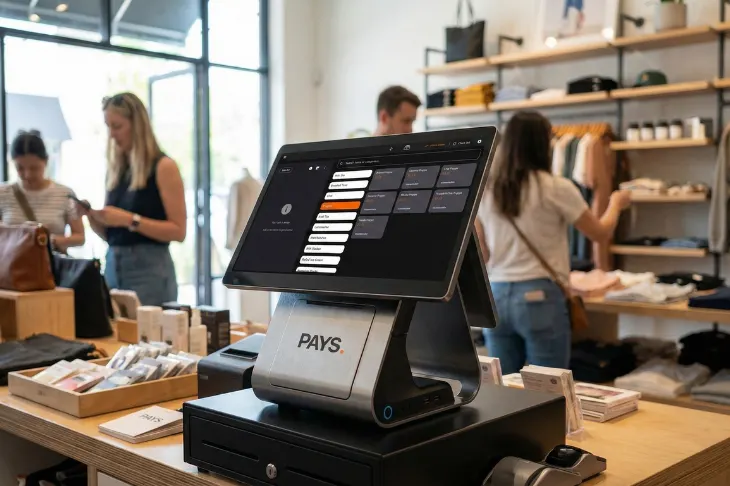
PAYS makes managing inventory simple and accurate, so you can focus on growing your business.
- Real-Time Visibility: Inventory updates automatically with every sale, giving you a clear view of stock levels.
- Smart Alerts: Get notifications before products run low, helping you avoid stockouts and overordering.
- Centralized Management: Sync inventory across in-store and online channels to prevent overselling.
- Actionable Insights: Dashboards show fast-moving items, slow sellers, and trends to guide smarter decisions.
- Scalable & Easy to Use: Intuitive design supports your team and grows with your business effortlessly.
PAYS turns inventory management from a headache into a strategic advantage.
Conclusion
Inventory mistakes don’t just slow your business, they cost you time, money, and customers. By relying on outdated manual processes or disconnected systems, you risk stockouts, overstocking, and missed opportunities.
A modern POS like PAYS puts you back in control. With real-time tracking, smart alerts, centralized management, and actionable insights, you can streamline operations, reduce errors, and make data-driven decisions that grow your business.
Take the guesswork out of inventory management.
Explore how PAYS POS can help you track stock in real time, avoid costly mistakes, and keep your retail operations running smoothly. Get Started with PAYS Today. Book a demo now.
FAQs
PAYS tracks inventory in real time and sends low-stock alerts before items run out, so you can reorder on time and keep high-demand products consistently available.
Yes. PAYS syncs inventory across all sales channels, giving you a centralized view of stock levels and preventing overselling or order cancellations.
Absolutely. PAYS is built to scale with your business, making it easy to manage inventory as you add new products, locations, or sales channels.
PAYS provides clear reports and insights on product performance, helping you identify fast-moving items, reduce slow-selling stock, and optimize purchasing decisions.
Yes. PAYS features an intuitive interface that allows your team to quickly check stock levels, manage products, and handle inventory tasks with minimal training.