How Much Do Point of Sale Systems Cost and Why Is PAYS Changing the Game?
TL;DR:
- POS system often costs more than advertised due to hardware, software, processing fees, and hidden charges.
- Traditional providers use complex pricing, long-term contracts, and add-ons that increase your expenses.
- PAYS offers 0% processing fees, eliminating per-transaction costs.
- Transparent pricing and next-day funding make cash flow predictable and faster.
How much does a POS system really cost, and why do you often end up paying far more than what was advertised? You’ve probably noticed that the number on the website is only the starting point. Once you factor in hardware, software subscriptions, processing fees, and a long list of hidden charges, the true cost can quickly become overwhelming.
The real challenge isn’t just the price; it’s the lack of transparency. Most POS providers make pricing confusing on purpose, leaving you guessing about what you’re truly committing to. And when every percentage point affects your margins, those unclear fees can quietly eat into your revenue.
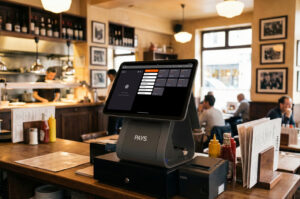
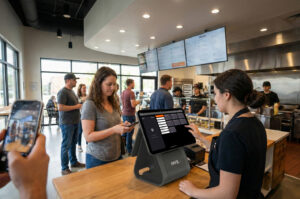
That’s exactly where PAYS changes everything. With zero processing fees and no hidden charges, PAYS gives you a POS model that’s simple, transparent, and designed to keep more money in your pocket.
What Makes Up the Cost of a Point of Sale System?
When you start evaluating POS options, the biggest challenge is understanding what you’re actually paying for. A “POS system cost” isn’t one number; it’s a collection of expenses that stack up month after month. Here’s what typically drives your total cost:
Hardware Costs
You’ll need devices like terminals, card readers, receipt printers, barcode scanners, tablets, or handheld units. Some providers sell them outright, others lease them at inflated rates. Either way, hardware quickly becomes one of your biggest upfront expenses.
Software Subscription Fees
Most POS systems run on a monthly or annual subscription model. On the surface, it may look affordable until you realize basic plans often exclude features you rely on, pushing you into higher-priced tiers.
Payment Processing Fees
This is where costs quietly balloon. Every tap, dip, or swipe comes with a fee. Even small percentages add up fast when you’re processing hundreds or thousands of transactions a month. For many businesses, processing fees end up costing more than the POS itself.
Add-ons & Integrations
Inventory management, loyalty programs, advanced analytics, online ordering, and employee time tracking are most providers treat these as paid add-ons. Individually, they seem minor, but together they can double your monthly POS bill.
Installation, Setup & Training Costs
Some providers charge extra for professional installation, onboarding, or training sessions. Even if these costs appear “optional,” many features are hard to use without them.
Support & Maintenance Fees
Support isn’t always included. You may have to pay for premium support, ongoing maintenance, or software upgrades, which means your “low monthly fee” can grow over time.
The Hidden Fees You Don’t See Coming
Even after you think you’ve understood the basic costs, most POS systems come with a layer of hidden fees that catch you by surprise. These fees aren’t obvious at the start, but they quietly add to your monthly spend and make your POS far more expensive than you planned.
Contract Lock-Ins
Many POS providers push long-term contracts that lock you in for 2–4 years. If you want to switch or scale down, you’re hit with heavy cancellation fees, sometimes thousands of dollars.
PCI Compliance Fees
Staying compliant with payment security standards is essential, but some providers charge you a monthly or annual fee just for meeting the basics of card acceptance.
Chargeback Fees
Any time a customer disputes a transaction, you pay a chargeback fee even if you win the dispute. For high-traffic businesses, this can stack up quickly.
Statement & Reporting Fees
Some providers charge you simply for monthly statements or access to “advanced reporting.” These are often tiny amounts that add up over time.
Minimum Processing Requirements
If you don’t hit a required monthly processing volume, you’re penalized with extra fees. This is especially painful for seasonal businesses or stores with fluctuating sales.
These hidden charges create unpredictable billing, making it difficult for you to budget or know what your POS will cost each month. This lack of clarity is one of the biggest reasons business owners feel trapped by their POS provider.
How Traditional POS Providers Keep Pricing Complicated
If you’ve ever tried comparing POS pricing across different providers, you already know how confusing it can feel. And that’s no accident. Many legacy POS companies intentionally structure their pricing to look cheaper up front while hiding the real costs in the fine print.
Here’s how that complexity usually shows up:
Tiered Pricing That Hides True Fees
You’ll see pricing tiers like “Basic,” “Pro,” and “Enterprise,” but what you actually need is often spread across multiple tiers. By the time you upgrade to access essential features, your monthly cost is far higher than expected.
Bundled Services You Didn’t Ask For
Many POS companies bundle add-ons like loyalty, marketing tools, or gift card programs into higher-priced plans even if you don’t need them. You’re forced to pay for features you’ll never use.
Long-Term Contracts With Auto-Renewals
These contracts are written to benefit the provider, not you. They include auto-renewal clauses, early termination penalties, and equipment return requirements, all designed to keep you locked in.
Third-Party Processor Markups
Some POS providers don’t handle payment processing themselves. They route it through a third-party processor that adds its own markup, making each transaction more expensive for you.
Leasing Agreements for Hardware
Instead of selling hardware, many companies lease it at inflated rates, turning a $300 terminal into a $1,200 long-term expense.
All of this makes it difficult for you to get a clear picture of what you’re truly paying and even harder to compare one POS provider to another. It’s why so many business owners feel trapped in overpriced systems that looked affordable on day one.
Why PAYS Is Changing the Game
While most POS providers add complexity, PAYS takes the opposite approach: it simplifies everything. Instead of piling on fees or locking you into long contracts, PAYS is built around one core idea: you should keep more of what you earn.
Here’s what makes PAYS dramatically different from traditional POS systems:
0% Processing Fees
This is the biggest game-changer. You no longer lose a percentage of every sale to payment processing. For many businesses, this alone saves thousands of dollars each year and increases profit margins instantly.
Transparent, All-In Pricing
With PAYS, what you see is what you pay. No statement fees, no PCI fees, no surprise add-ons. You get full clarity right from the start, so you can budget confidently and control your operating costs.
Next-Day Funding for Faster Cash Flow
Waiting 2–3 days for payouts can make it hard to manage inventory and payroll. PAYS solves this with guaranteed next-day funding, giving you quicker access to your own money.
AI-Powered POS Features Included
Unlike other systems that charge extra for advanced tools, PAYS builds intelligence into the platform, from automated workflows to smarter reporting. You stay ahead without paying extra for “premium features.”
Predictable Monthly Costs
No hidden surcharges. No unpredictable bills. Just a flat, predictable cost each month, making financial planning easier for you.
Built for High-Risk Industries
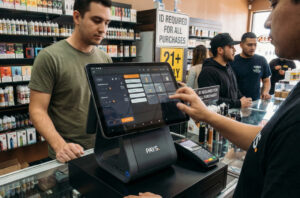
If you operate in a high-risk category like vape, smoke, or speciality retail, you’re familiar with extra fees and limitations. PAYS eliminates those pain points and makes payments simpler, not more expensive.
PAYS isn’t just another POS option; it’s a modern model built to save you money, simplify operations, and give you the financial control you’ve been missing.
Get PAYS POS now and cut your operating costs without compromising speed or features.
Frequently Asked Questions
Most POS systems range from $799 to $8000 per month, once hardware, software, and processing fees are included.
Because providers charge a percentage on every transaction, which adds up quickly for high-volume businesses.
Yes. PAYS eliminates per-transaction fees, helping you keep more of what you earn.
No. PAYS uses transparent, all-in pricing with no statement fees, PCI fees, or surprise charges.
PAYS provides reliable next-day funding, improving your cash flow immediately.